

Connect two buildings
One antenna at each end creates a point-to-point link.

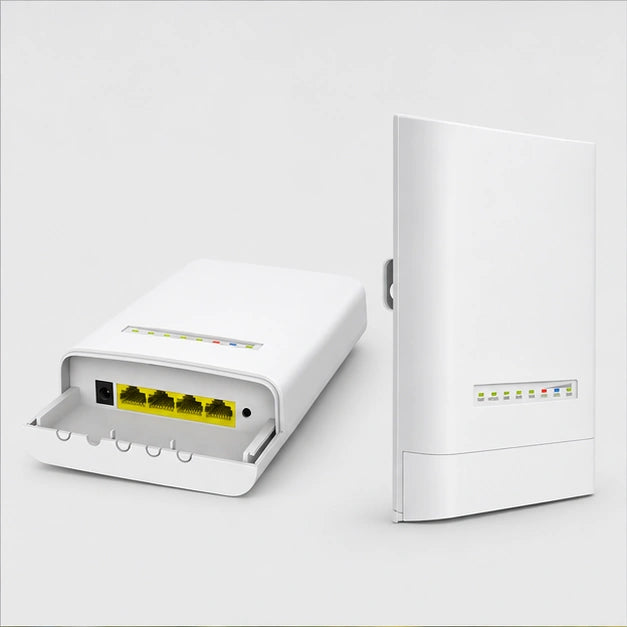
Connect your outbuilding to the home network
Install the two units facing each other to create the 5 GHz radio link. The equipment connects via 10/100 Mbps Ethernet on each side. The kit includes both bridges, their PoE injectors and their power supplies.
Available in stock
Order processing within 24–48 business hours. Estimated delivery within 4–8 business days of ordering, including processing.


Payments are processed by payment providers over encrypted connections. Available payment methods are shown at checkout.

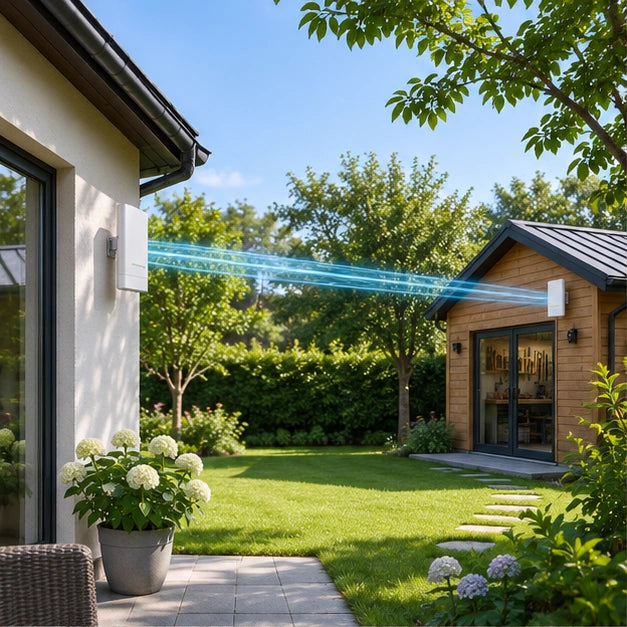
The two units establish a point-to-point network bridge in 5 GHz. Place them facing each other between the house and the outbuilding to extend the network without pulling a cable between the two buildings.
View featuresOne antenna at each end creates a point-to-point link.

The link is established between two antennas in direct line of sight.
Place one antenna on the network side and the second in the outbuilding.

The 5 GHz directional link requires a clear path between the units.

Each end uses an Ethernet connection and a 12 V passive PoE power supply.

One antenna on the house side, the other on the outbuilding side. The point-to-point link carries the network between the two buildings via a clear radio path.

From one facade to the other, the two antennas face each other. A direct line of sight between them promotes the link across the yard.

One antenna on the house side, the other on the outbuilding side. The point-to-point link carries the network between the two buildings via a clear radio path.
| Link | Point to point, 5 GHz |
|---|---|
| Housing | IP65 |
| Set | 2 antennas |
| Layout | Two units facing each other, one per building |
| Wi-Fi standard | 802.11ac in 5 GHz |
| Directional antenna | 12 dBi gain |
| Wired connection | Ethernet 10/100 Mbps |
| Dimensions of one unit | 193 × 109 × 61 mm |
| Power supply | Passive PoE 12 V, 1 A |
| Power adapter of the version sold | Power adapter with European plug |
One antenna connects to the house network and the other serves the outbuilding. The connection is established between two points with a direct line of sight.

At the outbuilding, the network arrives from the house via the wireless link. The Ethernet connection allows it to be taken into the building.
Yes. Place one unit on the network side and the second at the building to be served, orienting them towards each other.
The 5 GHz directional antennas must face each other on as clear a path as possible. First locate two points that can see each other and test the link before fixing the brackets.
Start with a single connected piece of equipment and check its operation at the intended location. Then add the other connections one by one. An unsuitable cable is easier to spot at this stage.
It extends an existing connection between two buildings. The first unit must be connected to the network to be shared and the second serves the remote building. Internet access still comes from the original network.
One antenna on the house side, the other on the outbuilding side. The point-to-point link carries the network between the two buildings via a clear radio path.

Clear information, secure checkout and support by email.
We help you choose products that suit your home.
Free returns within 30 days, subject to our return policy. Applicable statutory rights are unaffected.
Delivery estimates vary by product and shipping location. Please refer to the US delivery estimate on the product page. Order processing takes 1–2 business days.
Payments use an encrypted connection. Available payment methods are shown at checkout.

Track your package at every step using the link provided in your shipping email.

Changed your mind? Return your product for free, with no hidden fees or conditions.

Transactions protected by SSL encryption – Visa, Mastercard, PayPal, Apple Pay.

Email support: support@homegard24.com. Every day, 8:00 a.m.–8:00 p.m. (Paris time).

Responsive team at your disposal by email

Add to cart, check out, receive. We’ll take care of the rest.

Thousands of homes already protected with Homegard.


